Ingress 6

nexus helm: ingress path 변경

nexus helm(github.com/choisungwook/portfolio/tree/master/kubernetes/helm/nexus-charts)은 공식 helm을 참고하여 커스터마이징 했고 nexus-proxy를 사용하지 않습니다. nexus ingress path가 "/"이 아니고 다른 경로를 사용하려면, 환경변수 NEXUS_CONTEXT에 변경할 ingress path를 설정해야 합니다. ▶ helm chart values.yaml 예: github.com/choisungwook/portfolio/blob/master/kubernetes/helm/nexus-charts/values.yaml ingress: enabled: true annotations: {} # kubernetes.io/i..

kibana helm: ingress path 변경

kibana helm은 공식 helm(github.com/elastic/helm-charts/tree/master/kibana)을 사용했습니다. ingress path를 "/"가 아닌 다른 경로로 사용할 경우 healthCheckPath와 kibanaConfig를 수정해야 합니다. ▶ 수정 values.yaml: github.com/choisungwook/portfolio/blob/master/kubernetes/helm/efk-charts/charts/values.yaml kibana: service: type: NodePort healthCheckPath: "/kibana/app/kibana" kibanaConfig: kibana.yml: | server.basePath: /kibana server...

argocd helm: ingress path설정

1. 목표 argocd ingress path를 "/"가 아닌 다른 것으로 사용 2. 설정 2.1 컨테이너 환경변수 --rootpath를 추가하고 ingress path를 입력해줍니다. helm에서 extraArgs에 설정하면 컨테이너 환경변수에 자동으로 추가됩니다. 2.2 ingress설정 환경변수에서 설정한 값과 동일하게 paths를 설정합니다. ▶ helm values.yaml: github.com/choisungwook/portfolio/blob/master/kubernetes/helm/argocd-charts/values.yaml server: extraArgs: - --rootpath - /argocd ingress: # change here hosts: - "helloworld.com" # ..

쿠버네티스 Ingress를 이용한 nginx서비스 배포

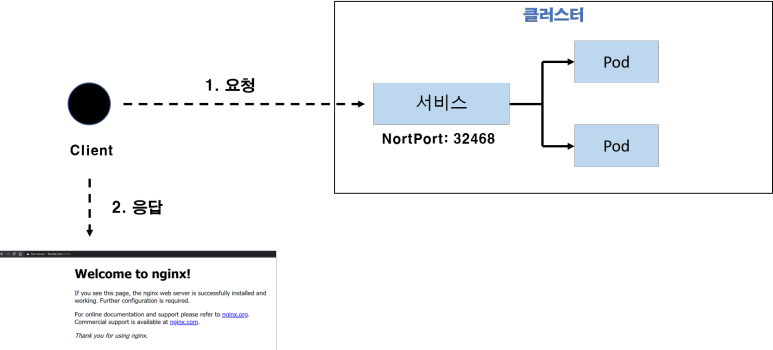
이번 글에서는 쿠버네티스 ingress를 이용해서 nginx서비스를 배포하고 접근하는 방법을 살펴봅니다. ※ pod, deployment, service에 대한 지식 필요 ​ ㅁ 실습환경 - virtualbox로 설치한 쿠버네티스 - master node 1개, worker node 1개 ㅁ 영상: https://youtu.be/ASQ9iuSmnMU 1. 기존 서비스를 이용한 접근 쿠버네티스에서 운영하는 컨테이너에 접근하기 위해서 서비스를 만듭니다. 그리고 "NodeIP:서비스포트"로 컨테이너에 접근하죠. 예를 들어 그림1에서는 NodeIP:32468을 요청하면 서비스에 연동된 nginx컨테이너로 접근합니다. 2. Ingress를 이용한 접근 ​ 각 서비스를 생성하고 접근할 때마다 각각 고유한 포트를 입..